SpringBoot_Word模板导出功能_多行复制功能的实现
Word模板导出框架:deepoove公司的poi-tl框架使用.以及自实现的拓展功能:Word中的表格需要进行多行的数据复制时的实现类;

SpringBoot_Word模板导出功能_多行复制功能的实现
一.基础使用
0.简介
详细介绍见官方文档,poi-tl(poi template language)是Word模板引擎,使用模板和数据创建很棒的Word文档。
现有Word模板导出方案对比:
| 方案 | 移植性 | 功能性 | 易用性 |
|---|---|---|---|
| Poi-tl | Java跨平台 | Word模板引擎,基于Apache POI,提供更友好的API | 低代码,准备文档模板和数据即可 |
| Apache POI | Java跨平台 | Apache项目,封装了常见的文档操作,也可以操作底层XML结构 | 文档不全,这里有一个教程:Apache POI Word快速入门 |
| Freemarker | XML跨平台 | 仅支持文本,很大的局限性 | 不推荐,XML结构的代码几乎无法维护 |
| OpenOffice | 部署OpenOffice,移植性较差 | - | 需要了解OpenOffice的API |
| HTML浏览器导出 | 依赖浏览器的实现,移植性较差 | HTML不能很好的兼容Word的格式,样式糟糕 | - |
| Jacob、winlib | Windows平台 | - | 复杂,完全不推荐使用 |
poi-tl具体的功能
| Word模板引擎功能 | 描述 |
|---|---|
| 文本 | 将标签渲染为文本 |
| 图片 | 将标签渲染为图片 |
| 表格 | 将标签渲染为表格 |
| 列表 | 将标签渲染为列表 |
| 图表 | 条形图(3D条形图)、柱形图(3D柱形图)、面积图(3D面积图)、折线图(3D折线图)、雷达图、饼图(3D饼图)、散点图等图表渲染 |
| If Condition判断 | 根据条件隐藏或者显示某些文档内容(包括文本、段落、图片、表格、列表、图表等) |
| Foreach Loop循环 | 根据集合循环某些文档内容(包括文本、段落、图片、表格、列表、图表等) |
| Loop表格行 | 循环复制渲染表格的某一行 |
| Loop表格列 | 循环复制渲染表格的某一列 |
| Loop有序列表 | 支持有序列表的循环,同时支持多级列表 |
| Highlight代码高亮 | word中代码块高亮展示,支持26种语言和上百种着色样式 |
| Markdown | 将Markdown渲染为word文档 |
| Word批注 | 完整的批注功能,创建批注、修改批注等 |
| Word附件 | Word中插入附件 |
| SDT内容控件 | 内容控件内标签支持 |
| Textbox文本框 | 文本框内标签支持 |
| 图片替换 | 将原有图片替换成另一张图片 |
| 书签、锚点、超链接 | 支持设置书签,文档内锚点和超链接功能 |
| Expression Language | 完全支持SpringEL表达式,可以扩展更多的表达式:OGNL, MVEL… |
| 样式 | 模板即样式,同时代码也可以设置样式 |
| 模板嵌套 | 模板包含子模板,子模板再包含子模板 |
| 合并 | Word合并Merge,也可以在指定位置进行合并 |
| 用户自定义函数(插件) | 插件化设计,在文档任何位置执行函数 |
1.框架依赖引入
1
2
3
4
5
<dependency>
  <groupId>com.deepoove</groupId>
  <artifactId>poi-tl</artifactId>
  <version>1.12.2</version>
</dependency>
2.基础使用
2.2.1 创建word文件模板,加入数据标记
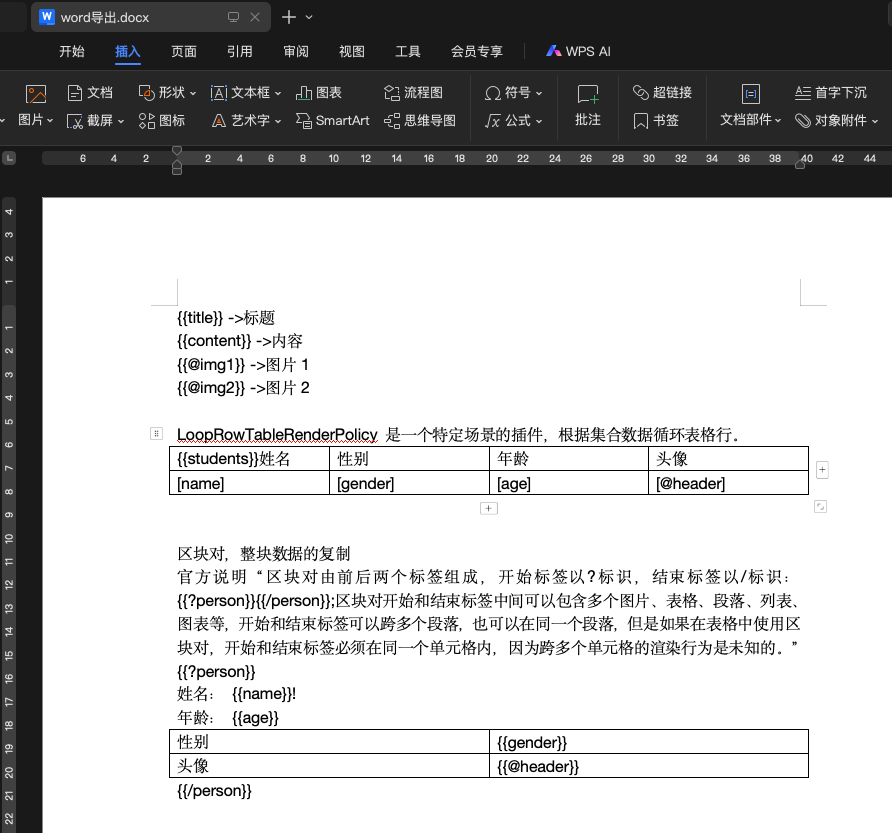
2.2.2 代码数据填充
1
2
3
4
5
6
7
8
9
10
11
12
13
14
15
16
17
18
19
20
21
22
23
24
25
26
27
28
29
30
31
32
33
34
35
36
37
38
39
40
41
42
43
44
45
46
47
48
49
50
    @SneakyThrows
    @PostMapping("export")
    public void export() {
        InputStream templateIns = ResourceUtil.getStream("templates/word导出.docx");//模板文件放置在项目中的resources目录下
        Map<String, Object> exportMap = new HashMap<>();
        /* ↓↓↓↓↓↓↓↓↓↓↓↓↓↓↓↓↓↓↓↓↓↓↓↓↓↓↓↓↓↓↓↓↓↓↓↓↓↓↓↓  导出数据填充 ↓↓↓↓↓↓↓↓↓↓↓↓↓↓↓↓↓↓↓↓↓↓↓↓↓↓↓↓↓↓↓↓↓↓↓↓↓↓↓↓ */
        exportMap.put("title", "测试标题");
        exportMap.put("content", "测试内容");
        //图片填充
        exportMap.put("img1", Pictures.ofUrl("http://www.baidu.com/img/bdlogo.png").size(20, 20).create());
        exportMap.put("img2", Pictures.ofUrl("http://rongcloud-web.qiniudn.com/docs_demo_rongcloud_logo.png").size(20, 20).create());
        //循环行数据填充
        exportMap.put("students",new ArrayList<Map<String, Object>>());
            add(new HashMap<String, Object>());
        }});
        //区块对数据填充
        exportMap.put("person",new ArrayList<Map<String, Object>>());
            add(new HashMap<String, Object>());
        }});
        /* ↑↑↑↑↑↑↑↑↑↑↑↑↑↑↑↑↑↑↑↑↑↑↑↑↑↑↑↑↑↑↑↑↑↑↑↑↑↑↑↑↑  导出数据填充 ↑↑↑↑↑↑↑↑↑↑↑↑↑↑↑↑↑↑↑↑↑↑↑↑↑↑↑↑↑↑↑↑↑↑↑↑↑↑↑↑↑ */
        //创建行循环策略
        LoopRowTableRenderPolicy rowTableRenderPolicy = new LoopRowTableRenderPolicy();
        Configure configure = Configure.builder()
                .bind("students", rowTableRenderPolicy) //循环行数据绑定
                //区块对是默认插件,不需要主动申明
                .build();
        XWPFTemplate template = XWPFTemplate.compile(templateIns, configure)
                .render(exportMap);
        String fileName = DateUtil.format(new Date(), "yyyyMMddHHmmss") + "-导出.docx";
        setFileName(response, fileName);
        //写回到响应流中
        OutputStream out = response.getOutputStream();
        BufferedOutputStream bos = new BufferedOutputStream(out);
        template.write(bos);
        bos.flush();
        out.flush();
        PoitlIOUtils.closeQuietlyMulti(template, bos, out);
    }

    //设置下载文件名
    @SneakyThrows
    private void setFileName(HttpServletResponse response, String fileName) {
        StringBuilder contentDispositionValue = new StringBuilder();
        contentDispositionValue.append("attachment; filename=").append(URLUtil.encode(fileName, "UTF-8")).append(";").append("filename*=").append("utf-8''").append(URLUtil.encode(fileName, "UTF-8"));
        response.addHeader("Access-Control-Allow-Origin", "*");
        response.addHeader("Access-Control-Expose-Headers", "Content-Disposition,download-filename");
        response.setHeader("Content-disposition", contentDispositionValue.toString());
        response.setHeader("download-filename", URLUtil.encode(fileName, "UTF-8"));
        response.setContentType("application/octet-stream");
    }
3.填充结果
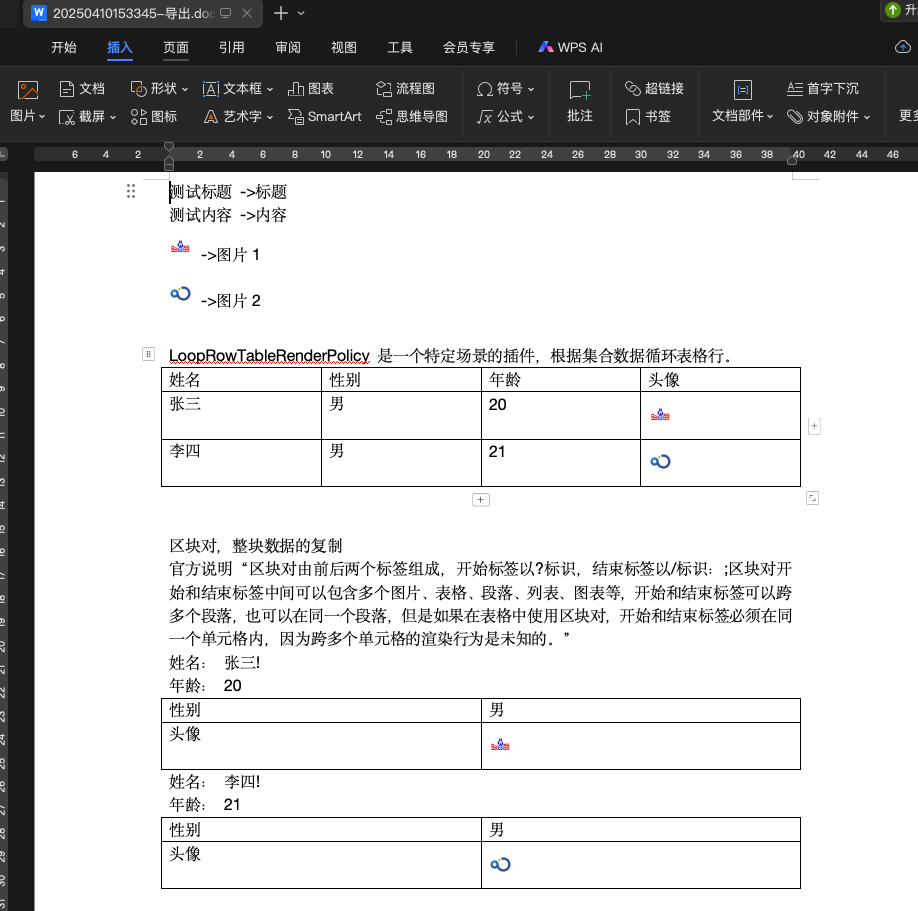
更多的填充插件功能,参考官网的示例.
二.拓展Word中表格多行复制
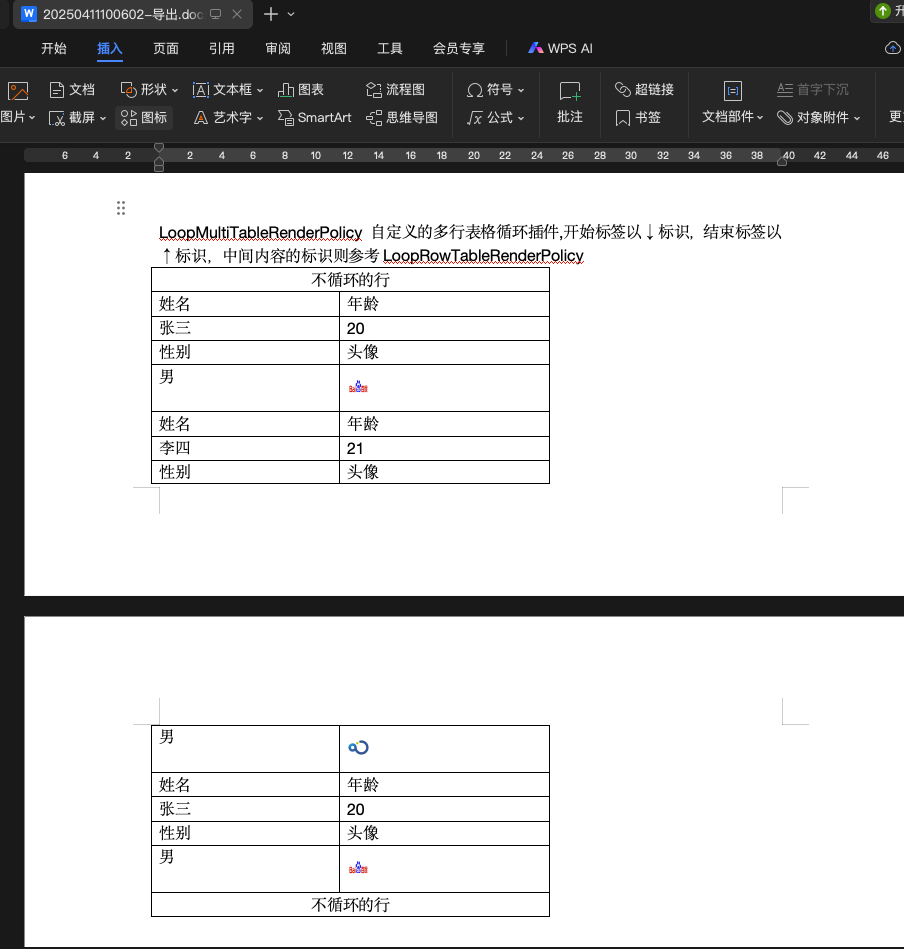
官方的拓展插件中虽然可以使用区块对,进行多行的循环,但是区块对针对表格中的部分内容(例如某两行)进行循环,则不支持. 所以此块需要使用自实现的多行表格的循环处理; 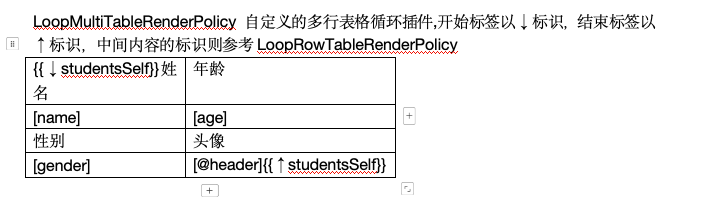
模板内容
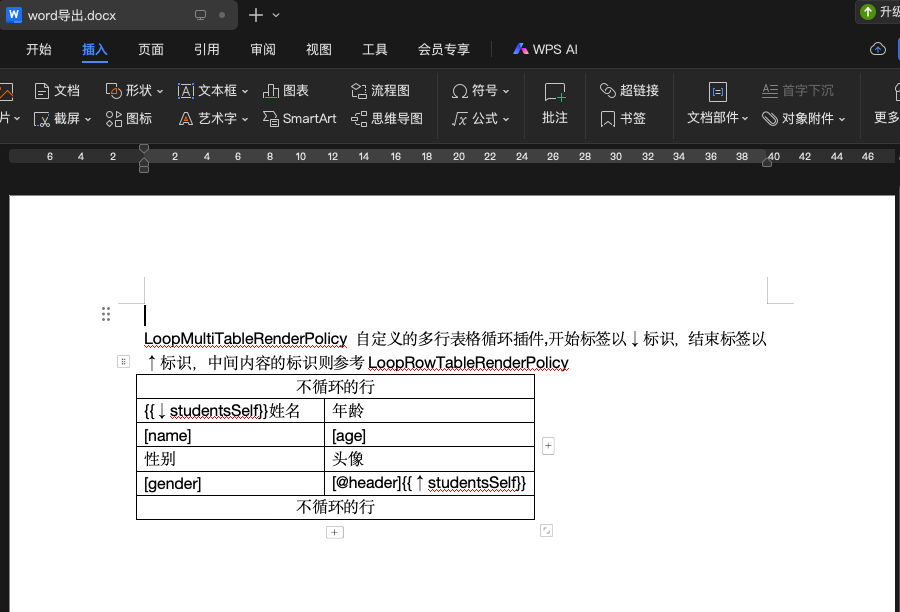
插件
1
2
3
4
5
6
7
8
9
10
11
12
13
14
15
16
17
18
19
20
21
22
23
24
25
26
27
28
29
30
31
32
33
34
35
36
37
38
39
40
41
42
43
44
45
46
47
48
49
50
51
52
53
54
55
56
57
58
59
60
61
62
63
64
65
66
67
68
69
70
71
72
73
74
75
76
77
78
79
80
81
82
83
84
85
86
87
88
89
90
91
92
93
94
95
96
97
98
99
100
101
102
103
104
105
106
107
108
109
110
111
112
113
114
115
116
117
118
119
120
121
122
123
124
125
126
127
128
129
130
131
132
133
134
135
136
137
138
139
140
141
142
143
144
145
146
147
148
149
150
151
152
153
154
155
156
157
158
159
160
161
162
163
164
165
166
167
168
169
170
171
172
173
174
175
176
177
178
import cn.hutool.core.util.StrUtil;
import com.deepoove.poi.XWPFTemplate;
import com.deepoove.poi.data.PictureRenderData;
import com.deepoove.poi.exception.RenderException;
import com.deepoove.poi.policy.PictureRenderPolicy;
import com.deepoove.poi.policy.RenderPolicy;
import com.deepoove.poi.template.ElementTemplate;
import com.deepoove.poi.template.run.RunTemplate;
import com.deepoove.poi.util.TableTools;
import lombok.SneakyThrows;
import org.apache.poi.xwpf.usermodel.*;
import org.openxmlformats.schemas.wordprocessingml.x2006.main.CTRow;

import java.util.HashMap;
import java.util.List;
import java.util.Map;

/*循环复制多行的策略*/
public class LoopMultiRowTableRenderPolicy implements RenderPolicy {
    private String itemPrefix;
    private String itemSuffix;

    private int startRowStart;//起始行
    private int startRowEnd;//结束行
    private int rowDiff;//行数差异


    public LoopMultiRowTableRenderPolicy() {
        this("[", "]");
    }

    public LoopMultiRowTableRenderPolicy(String itemPrefix, String itemSuffix) {
        this.itemPrefix = itemPrefix;
        this.itemSuffix = itemSuffix;
    }

    /**
     * @description 深入拷贝指定行, 返回新的行数据
     * @create: 2025/3/13 11:05
     **/
    @SneakyThrows
    private XWPFTableRow deepCloneRow(XWPFTable table, XWPFTableRow row) {
        CTRow ctrow = CTRow.Factory.parse(row.getCtRow().newInputStream());//重点行
        XWPFTableRow newRow = new XWPFTableRow(ctrow, table);
        return newRow;
    }

    /**
     * @description 根据行的模板标记, 填充数据
     * @create: 2025/4/10 17:13
     **/
    @SneakyThrows
    private void fillRowData(XWPFTableRow row, Map<String, Object> rowData) {
        List<XWPFTableCell> tableCells = row.getTableCells();// 在新增的行上面创建cell
        for (XWPFTableCell cell : tableCells) {
            for (XWPFParagraph paragraph : cell.getParagraphs()) {
                List<XWPFRun> runs = paragraph.getRuns();
                for (int i = 0; i < runs.size(); i++) {
                    XWPFRun r = runs.get(i);
                    String text = r.getText(0);
                    if (StrUtil.isNotEmpty(text)) {
                        String pureText = text.replace(itemPrefix, "")
                                .replace(itemSuffix, "")
                                .replace("@", "");
                        if (rowData.containsKey(pureText)) {
                            Object rowDataItem = rowData.get(pureText);
                            if (rowDataItem instanceof Number || rowDataItem instanceof String) {
                                r.setText(String.valueOf(rowDataItem), 0);//要深入到原cell中的run替换内容才能保证样式一致
                            }
                            if (rowDataItem instanceof PictureRenderData) {
                                XWPFRun run = paragraph.createRun();
                                PictureRenderData picture = (PictureRenderData) rowDataItem;
                                PictureRenderPolicy.Helper.renderPicture(run, picture);
                                paragraph.removeRun(0);//移除可能已经存在的图片
                            }
                        }
                    }
                }
            }
        }
    }

    @Override
    public void render(ElementTemplate eleTemplate, Object data, XWPFTemplate template) {
        RunTemplate runTemplate = (RunTemplate) eleTemplate;
        XWPFRun run = runTemplate.getRun();
        try {
            if (!TableTools.isInsideTable(run)) {
                throw new IllegalStateException(
                        "The template tag " + runTemplate.getSource() + " must be inside a table");
            }
            XWPFTableCell startTagCell = (XWPFTableCell) ((XWPFParagraph) run.getParent()).getBody();
            XWPFTable table = startTagCell.getTableRow().getTable();
            run.setText("", 0);

            startRowStart = getTemplateRowIndex(startTagCell);//开始行的索引
            // 找到结束行的索引
            int templateRowIndexStartEnd = getTemplateRowIndexByTemplateTag(table, startRowStart, "↑" + runTemplate.getTagName(), true);
            if (templateRowIndexStartEnd == -1) {
                throw new IllegalStateException(
                        "The template end tag " + runTemplate.getSource() + " not found in table");
            }

            /* ↓↓↓↓↓↓ 模板行数据填充 ↓↓↓↓↓↓ */
            rowDiff = templateRowIndexStartEnd - startRowStart + 1;
            Map<Integer, XWPFTableRow> templateRowsMap = new HashMap<>();
            for (int i = 0; i < rowDiff; i++) {
                templateRowsMap.put(i, table.getRow(startRowStart + i));
            }
            /* ↑↑↑↑↑↑ 模板行数据填充 ↑↑↑↑↑↑ */
            List<Map<String, Object>> dataMaps = (List<Map<String, Object>>) data;
            for (int i = 0; i < dataMaps.size(); i++) {
                Map<String, Object> rowData = dataMaps.get(i);
                //需要复制的具体行
                for (int j = 0; j < rowDiff; j++) {
                    XWPFTableRow templateRow = templateRowsMap.get(j);
                    //复制模板行
                    if (i != dataMaps.size() - 1) {
                        XWPFTableRow copyRow = deepCloneRow(table, templateRow);
                        fillRowData(copyRow, dataMaps.get(i + 1));
                        table.addRow(copyRow, startRowStart + ((i + 1) * rowDiff) + j);
                    }
                    //填充数据
                    if (i == 0) {
                        // 填充templateRow
                        fillRowData(templateRow, rowData);
                    }
                }
            }
        } catch (Exception e) {
            throw new RenderException("HackLoopTable for " + eleTemplate + "error: " + e.getMessage(), e);
        }
    }

    private int getTemplateRowIndex(XWPFTableCell tagCell) {
        XWPFTableRow tagRow = tagCell.getTableRow();
        return getRowIndex(tagRow);
    }

    private int getTemplateRowIndexByTemplateTag(XWPFTable table, int templateRowIndexStart, String templateTag, boolean clearTag) {
        int index = -1;
        List<XWPFTableRow> rows = table.getRows();
        for (int i = templateRowIndexStart; i < rows.size(); i++) {
            XWPFTableRow xwpfTableRow = rows.get(i);
            List<ICell> tableICells = xwpfTableRow.getTableICells();
            for (ICell tableICell : tableICells) {
                if (tableICell instanceof XWPFTableCell) {
                    String text = ((XWPFTableCell) tableICell).getText();
                    if (text.contains(templateTag)) {
                        //清空模板标记的内容
                        if (clearTag) {
                            String nText = text.replace(" + templateTag + ", "");
                            List<XWPFParagraph> paragraphs = ((XWPFTableCell) tableICell).getParagraphs();
                            for (XWPFParagraph paragraph : paragraphs) {
                                List<XWPFRun> runs = paragraph.getRuns();
                                for (int j = 0; j < runs.size(); j++) {
                                    if (j == 0) {
                                        runs.get(0).setText(nText, 0);//注意在模板上,在对应的位置上使用任务文本占位,此处才能在这个pos然后进行内容的替换
                                    } else {
                                        runs.get(j).setText("", 0);
                                    }
                                }
                            }
                        }
                        return i;
                    }
                }
            }
        }
        return index;
    }

    private int getRowIndex(XWPFTableRow row) {
        List<XWPFTableRow> rows = row.getTable().getRows();
        return rows.indexOf(row);
    }

}
插件使用
1
2
3
4
5
6
7
8
9
10
11
12
13
14
15
16
17
18
19
20
21
22
23
24
25
Map<String, Object> exportMap = new HashMap<>();
/* ↓↓↓↓↓↓↓↓↓↓↓↓↓↓↓↓↓↓↓↓↓↓↓↓↓↓↓↓↓↓↓↓↓↓↓↓↓↓↓↓  导出数据填充 ↓↓↓↓↓↓↓↓↓↓↓↓↓↓↓↓↓↓↓↓↓↓↓↓↓↓↓↓↓↓↓↓↓↓↓↓↓↓↓↓ */
//自定义多行循环
exportMap.put("studentsSelf", new ArrayList<Map<String, Object>>() );
    add(new HashMap<String, Object>() );
    add(new HashMap<String, Object>() );
}});
/* ↑↑↑↑↑↑↑↑↑↑↑↑↑↑↑↑↑↑↑↑↑↑↑↑↑↑↑↑↑↑↑↑↑↑↑↑↑↑↑↑↑  导出数据填充 ↑↑↑↑↑↑↑↑↑↑↑↑↑↑↑↑↑↑↑↑↑↑↑↑↑↑↑↑↑↑↑↑↑↑↑↑↑↑↑↑↑ */
LoopMultiRowTableRenderPolicy multirowTableRenderPolicy = new LoopMultiRowTableRenderPolicy();
Configure configure = Configure.builder()
        .addPlugin('↓', rowTableRenderPolicy) //循环行数据绑定
        .bind("studentsSelf", multirowTableRenderPolicy) //自定义多行数据复制插件
        //区块对是默认插件,不需要主动申明
        .build();
XWPFTemplate template = XWPFTemplate.compile(templateIns, configure)
        .render(exportMap);
String fileName = DateUtil.format(new Date(), "yyyyMMddHHmmss") + "-导出.docx";
setFileName(response, fileName);//基础使用中的公共方法
//写回到响应流中
OutputStream out = response.getOutputStream();
BufferedOutputStream bos = new BufferedOutputStream(out);
template.write(bos);
bos.flush();
out.flush();
PoitlIOUtils.closeQuietlyMulti(template, bos, out);
填充结果
本文由作者按照 CC BY 4.0 进行授权